Running Micro-frontends with Single-SPA and Import Maps
We built a micro-frontend setup for 4+ teams. It has been running for years, with thousands of independent deploys. Here is what we learned.
Why We Did It
We had more than 8 applications. They needed to share components. But each team needed to deploy on its own. That is the classic micro-frontend problem.
Our solution: Single-SPA with ES modules and import maps. Each team owns its app inside a Rush.js monorepo. We share one design system and common utilities.
The Architecture
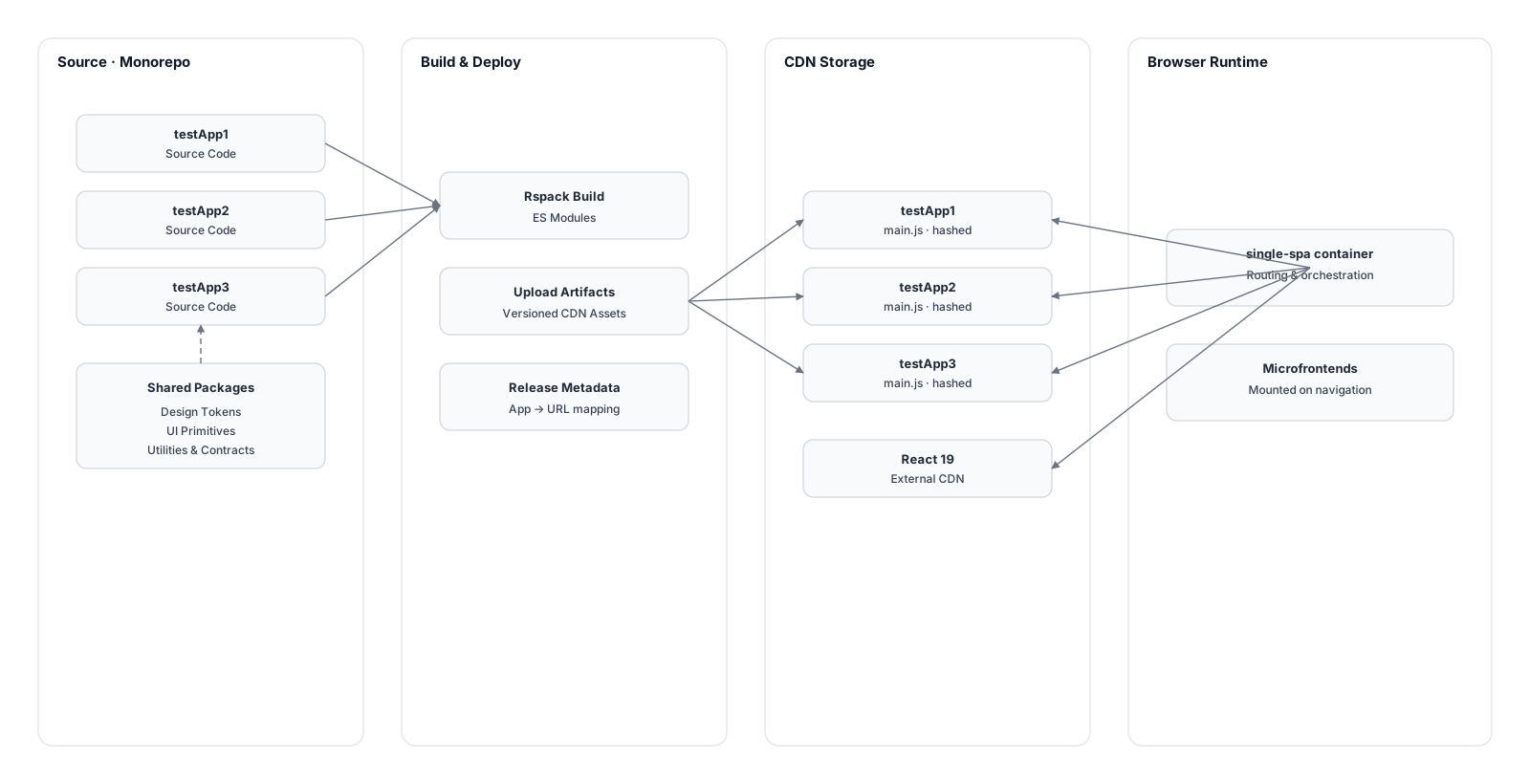 Single-SPA orchestration with ES modules and import maps
Single-SPA Orchestration
We looked at Module Federation first. We chose Single-SPA instead. It is simpler and more flexible. Single-SPA is a lightweight router. It loads micro-frontends based on the URL.
// apps/single-spa-container/src/root-config.ts
const loadApp = async (name: string) => {
  if (name === "legacy-app") {
    // Legacy Angular app uses SystemJS
    const { imports: base = {} } = parseImportMap("#apps-import-map");
    const url = base["legacy-app"];
    const module = await System.import(url);
    return module.default ?? module;
  }

  // Modern React apps use ES modules
  const module = await import(/* webpackIgnore: true */ name);
  return module.default ?? module;
};

export const initializeRootConfig = () => {
  const microFrontsConfig = getMicroFrontsConfig();

  microFrontsConfig.forEach(({ name, activeWhen }) => {
    registerApplication({
      name,
      app: () => loadApp(name),
      activeWhen,
    });
  });
};
Route-Based Activation
Each app decides when it is active. It uses URL patterns for that.
// apps/single-spa-container/src/micro-fronts-config.ts
export const getMicroFrontsConfig = () => [
  {
    name: "testApp1",
    activeWhen: (location: Location) =>
      (matchPath("/app1/*", location.pathname) &&
        location.pathname !== "/app1/settings") ||
      matchPath("/apps/list", location.pathname),
  },
  {
    name: "testApp2",
    activeWhen: (location: Location) =>
      pathMatches(["/app2-list/*", "/apps/list/*"], location),
  },
  // ... 8 more apps
];
App Structure
Each micro-frontend exports Single-SPA lifecycle functions.
// apps/testApp1/src/App.tsx
import singleSpaReact from "single-spa-react";

const lifecycles = singleSpaReact({
  React,
  ReactDOMClient,
  rootComponent: Main,
  renderType: "createRoot",
  domElementGetter: () => {
    const element = document.getElementsByClassName("sspa-container")[0];
    if (!element) {
      throw new Error("Container element not found");
    }
    return element;
  },
});

export const { bootstrap, mount, unmount } = lifecycles;
Rush.js Monorepo
We use Rush.js to manage the monorepo. We have 10+ apps and shared libraries.
Rush takes care of:
- Dependencies across all projects
- Building only what changed (and what depends on it)
- Same tooling and versions everywhere
- Custom commands for our deployment flow
Build System: Rspack
We use Rspack. It is a Rust-based alternative to webpack. Builds are faster. Apps are built as ES modules.
// apps/testApp1/rspack/prod.js
module.exports = () => ({
  mode: "production",
  externals: externalDependencyList, // React, ReactDOM, etc.
  output: {
    module: true,
    libraryTarget: "module",
    filename: `main.${shortHash}[contenthash].js`,
    publicPath: `https://cdn.test.example.com/testApp1/${shortHash}/`,
  },
});
Import Maps
Import maps are JSON files. They map module names to CDN URLs. We generate them during deployment.
{
  "imports": {
    "react": "https://esm.sh/react@19.1.1",
    "react-dom": "https://esm.sh/react-dom@19.1.1",
    "testApp1": "https://cdn.test.example.com/testApp1/abc123/main.abc123.js",
    "testApp2": "https://cdn.test.example.com/testApp2/def456/main.def456.js"
  }
}
The HTML template includes the import map.
<!-- apps/server/src/views/index.ejs -->
<script type="importmap" id="apps-import-map">
  <%- importMapContent %>
</script>
<script type="module">
  import("single-spa-container");
</script>
Deployment Flow
- Build: Each app builds on its own. We use the git commit hash in the output.
- Upload: We upload the build output to our S3 CDN.
- Import map: We create or update the import map with the new app URLs.
- Publish: We publish the import map to the target environment.
# Build and deploy specific apps
rush build-apps --apps testApp1,testApp2
rush create-import-map --apps testApp1,testApp2 --upload --publish
What Went Right
Independent deployments. Teams can ship features without waiting for others. We used to spend hours in planning meetings. Now we do not.
Shared design system. One place for all components.
Change a button in @testLib-ui/ui-lib and it updates everywhere.
Team autonomy. Each team owns its code, its tests, its CI/CD. We have fewer “who broke the build?” messages.
Selective builds. Rush builds only what changed. If you change testApp1, testApp2 does not rebuild.
Single React instance. We load React and ReactDOM once from the CDN. All apps use the same instance. No version clashes. Smaller bundles.
What Went Wrong
Version problems at the start. One app on React 19.1, another on 18.2. Debugging hydration errors was a nightmare. We fixed it by externalizing React and using one version via import maps.
Bundle size at the start. Every app was bundling its own React. We fixed it by putting React in the externals list and loading it once from the CDN.
Development setup. Running everything locally means many terminals and many dev servers. We added import-map-overrides so developers can point specific apps to localhost.
Legacy Angular app. One of our apps still uses Angular. It uses SystemJS instead of ES modules. The container has special handling for it.
The Fixes
External Dependencies
We externalize shared dependencies. So they are not bundled inside each app.
// apps/external-dependency-lists.js
export const externalDependencyList = [
  "react",
  "react-dom",
  "react-dom/client",
  "single-spa",
  "styled-components",
];
They are loaded once via import maps.
// commands/lib/utils/dependency-map.js
const dependencyMap = {
  react: "https://esm.sh/react@19.1.1",
  "react-dom": "https://esm.sh/react-dom@19.1.1",
  "single-spa": "https://esm.sh/single-spa@5.9.3",
};
Development Experience
We use import-map-overrides for local development.
- Run your app:
rush start --only testApp1 - In the browser console, enable devtools:
localStorage.setItem('devtools', true) - Override the import map so your app points to
http://localhost:3002/main.js - Refresh. You see your local changes.
Selective Deployment
Our CI/CD builds and deploys only the apps that changed.
# .github/workflows/pipeline.yml
- name: Get Rush list output (impacted)
  run: bash scripts/get-rush-list-impacted.sh
A change in testApp1 does not trigger a rebuild of testApp2. That saves time and resources.
Should You Do It?
Micro-frontends are not the answer to everything. They add complexity. But if you have:
- Multiple teams working on different parts of the product
- A real need to deploy independently
- Shared components but separate codebases
- Different release cycles per team
Then it might be worth it. We cut deployment dependencies by about 60%. Feature delivery became roughly 3x faster.
If you are a small team on one product, skip it. Use a monorepo. Keep it simple.
The Lesson
Every architecture is a trade-off. With micro-frontends we gained:
- Autonomy: Teams deploy on their own.
- Speed: Features go out faster.
- Scalability: Adding a new app is straightforward.
- Isolation: A bug in one app does not take down the rest.
We also paid for it:
- Complexity: More pieces, harder to debug.
- Bundle size: Even with externals, there is some overhead.
- Development setup: More terminals, more servers.
- Coordination: We still need to agree on shared libraries and versions.
You need to know what you are trading. And that the trade is worth it for your case.
Key Takeaways
- We chose Single-SPA over Module Federation. Simpler and more flexible. It works with any framework.
- ES modules and import maps. Standard web APIs. No lock-in.
- Externalize shared dependencies. One React instance. Smaller bundles.
- Rush.js for the monorepo. It works well for dependencies and selective builds.
- Build only what changed. Saves time.
- Import-map-overrides. We could not do local development without it.
This setup has been in production for 5+ years. It is not perfect. But it solved our problem: many teams, independent deployments, shared components. If your situation is similar, you might find it useful too.